Registration 2026
REGISTRATION 2026: details on dates, enrolment and curriculum advice.
Registration is compulsory process for all students. Students are expected to attend their assigned curriculum advice session (see schedule) and submit their registration request by the 13 February 2026-deadline. |
All students registered to undergraduate Humanities programmes require two levels of curriculum review in order to finalise their registration:
the first level is in-person curriculum advice, and
the second level is incorporated into (Steps 12-14 of) the registration task on PeopleSoft.
Students must finalise their registration task (or request approval on Step 12 of the registration task) by Friday, 13 February 2026. Importantly, students will not be able to proceed past Step 11 of their registration task on PeopleSoft without completing the first level of curriculum review (unless otherwise specified on the registration schedule).
*See Step 3 of the Registration Process, below, for the registration method applicable to you.
First year students (incl. transferring students) are required to attend Orientation, where various topics about life at UCT are discussed (including academic matters), before starting the registration process. While this will be covered in the presentations at Orientation, first year students are invited to review the 2026 Humanities Undergraduate Handbook (linked above) to get a sense of their programme structure and requirements. For BA/BSocSc students, a list of majors is available and the requirements for major are indicated under their respective department entries. The back half of the handbook hold course outlines, split according to the department that owns the course. Please try to form a general idea of which courses/majors you would like to take in 2026 before seeing a curriculum advisor. If you are fairly sure of your selection, you may plot this out to the above linked curriculum planner.
Returning students are asked draft their selection of courses to the above-linked curriculum planner before seeing a curriculum advisor. Failure to adequately prepare will result in longer consultations and, unfortunately, longer wait limes.
First year BSW students: you do not require curriculum advice and must please proceed to the Registration Task on PeopleSoft.
|
For BA/BSocSc students: BA and BSocSc students will book one-on-one advice sessions within the timeframes outlined in the registration schedule. Preferred dates or times are not guaranteed, as sessions are booked on a first-come-first-served basis.
|
This is your opportunity to consult a curriculum advisor, in-person, and have your academic advice hold lifted by Faculty Office Staff stationed in the venue. By the end of your consultation, you should have a completed curriculum planner, which you will keep for your own records and use to populate your registration task on PeopleSoft.
Please see the above-linked registration schedule to confirm when and where your session is being held, and what to bring with you. If you are not sure of where your venue is situated on campus, please refer to our Campus Maps or ask to an Orientation Leader on campus.
The Faculty Office has staff available to guide students through the PeopleSoft portion of the registration process and assist this any encountered errors. Please visit the Hold-lifting/ PS Support Venue, per the registration schedule. |
Your registration task on PeopleSoft is located under the ‘Tasks’ tile. Steps 1-10 involve confirming of your details and agreeing to a declaration. Step 11 displays any holds you may have on your record (such as IAPO pre-registration, fee debt, or academic advice holds), and will not allow you to progress to steps 12-14 until they are resolved. Step 12 is where one selects the courses (per your curriculum planner) and request final review/approval.
At step 12, there are two registration methods available to Humanities undergraduate students according to their programme and academic level, namely: Programme Enrolment, and Blank Shopping Cart. Please see the below table to determine the selection method applicable to you:
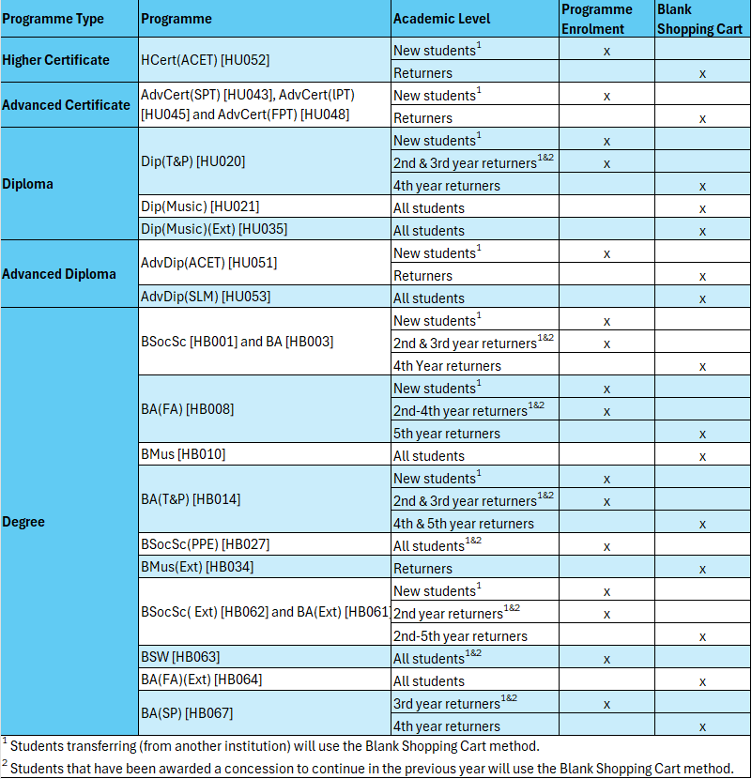
Guides for the respective registration methods are linked above under ‘Important Resources’.
Regardless of your registration method, you (the student) are responsible for regularly checking the status of your registration request until you have enrolled. Should an advisor notice an issue or missing information, they will set your request to INCOMPLETE-status, you will receive an email alerting you to update your request. Please be reminded that all UCT communications are sent to your MyUCT mailbox, and it is your responsibility to check this mailbox regularly.
Lastly, it is your responsibility to check your academic transcript for any errors and submit a change of curriculum request in the first week of lectures to rectify.
Please see the Generating your Academic Transcript Guide for assistance in accessing your academic transcript on PeopleSoft.
Note: you cannot submit a change of curriculum service request during registration. Should you change your mind after registering, or notice an error, please submit a change of curriculum request in the first week of lectures (16-20 February) – further instructions on Change of Curriculum will be relayed closer to the time. Change of curriculum service requests received before 16 February will simply be rejected (unless the request includes a change in programme).
Please ensure that you have read and understood the above information before contacting any of the below mailboxes.
Academic concession requests | humanities.uct.ac.za/hum/students/concessions (visit this link for the relevant authority) |
Credit transfer queries | hum-curr-queries@uct.ac.za (first see https://humanities.uct.ac.za/hum/apply/ug/transfer) |
Deferred registration slot permission requests | hum-ugrad@uct.ac.za (using the subject line ‘2026 Overflow Registration Request – [Your student number]’.) |
Enriched curriculum (DML) queries | |
Fees hold queries | |
International/visa hold queries | |
Laptop allocation queries | Information found at icts.uct.ac.za/services-student-computing/allocation-uct-laptops |
Matric exemption hold queries | |
Orientation queries | |
Password-related issues | icts-helpdesk@uct.ac.za (first see password.uct.ac.za) |
PeopleSoft/Registration task queries | Please visit the Hold-lifting/ PS Support Venue, per the registration schedule. |
Programme change requests | |
All other registration-related queries |
For further assistance, please contact hum-postgrad@uct.ac.za.